Search within Lanny's blog:


Leave me comments so I know people are actually reading my blogs! Thanks!

Wednesday, January 08, 2025

How to Make Your To-Do List Actually Useful - The 6-Box Template

Other Random Thoughts Posts


To-do lists are everywhere, but most people don’t use them effectively. Instead of helping, they often turn into endless, guilt-inducing lists of unchecked tasks. After plenty of trial and error, I’ve figured out a system that actually works. And today, I’m sharing it with you.


My 6-Box To-Do List Template

First, let me introduce you to the secret weapon that keeps me organized: the 6-Box To-Do List template I created myself. I use this every day on my iPad with the Goodnotes app (which, by the way, is free). Here’s how it works:


At the top, I write the date and day of the week (I usually create pages for the entire week at once). The template itself is a simple 2x3 table that divides my tasks into Home and Work categories. Each category is further split into three types: Must, Ideal, and Must NOT.

Here’s the breakdown:

  • Must: This is the non-negotiable stuff. Things I absolutely have to do today or tasks I’m highly motivated to complete. The key is to prioritize. Keep this list short and focus on crossing off at least 80% of it.

  • Ideal: These are my “bonus” tasks. I’d like to get them done, but if I don’t, no big deal. It’s like the dessert of my productivity day—nice to have, but not essential.

  • Must NOT: This is where things get interesting. This box is my reminder of what NOT to do today. It could include:

    1. Tasks that aren’t worth my time (hello, endless scrolling through YouTube shorts).

    2. Things I’m intentionally pushing to another day because they’re too time-intensive or require more focus than I’ve got for the day.

Writing these down is like decluttering my brain. It’s a mental unload that helps me stay focused and stress-free.


My To-Do List Principles

Having a great template is only half the battle. Here are some key principles I follow to make sure my To-Do List works for me, not against me:

  1. The 5-Minute Rule: If a task takes 5 minutes or less, just do it now. Don’t waste time writing it down. The exception? If you have a bunch of quick tasks to remember, jot them all down together before they skip your brain.

  2. Keep the Must Box Manageable: Overloading this box is a surefire way to set yourself up for failure. If you’re constantly carrying tasks over to the next day, it’s time to re-evaluate and preload tasks to future days.

  3. Separate Repeating Tasks: Daily habits (like drinking water or checking email) don’t belong on your To-Do List. Use a habit tracker or a different tool for those. I’ll dive deeper into this in a future blog post.

  4. Start Your Day with a Plan: Creating or finalizing your To-Do List first thing in the morning is a great way to plan the day. It sets the tone, helps you prioritize, and ensures you’re clear on your goals right from the start.


A Few Touchups in Goodnotes

  1. Stamps: Sometimes, I like to spice up my To-Do List with digital stamps, marking tasks as either Important (stuff that might get me in trouble if I skip) or Happy (tasks that bring me joy when completed). These items are more likely to get done.
  2. Highlighter: When I complete a task, I use the highlighter tool to mark it. There’s something immensely satisfying about seeing those colorful highlights at the end of the day. It’s like a visual trophy case of your productivity, and reviewing the list becomes a moment of pride instead of stress.
  3. Cut/Paste: One of the reasons I love using Goodnotes for my To-Do List is how easy it is to move tasks around. Didn’t finish something today? Drag it to tomorrow. Priorities shifted? Rearrange your boxes without rewriting a thing.

Final Thoughts: Less Stress, More Success

A good To-Do List isn’t about cramming as much as possible into your day. It’s about focusing on what matters, staying organized, and giving yourself the mental space to actually enjoy crossing things off. With the 6-Box method, I hope you feel more in control.

So give it a try, and let me know how it goes in the comments.


Other Random Thoughts Posts


Picture of The Day

[image or embed]

— Dr. Tree (@lannyland.com) January 11, 2025 at 9:02 PM

P.S. Remember, the easiest way to keep up with my journey is by visiting blog.lannyland.com 

Tuesday, January 07, 2025

Money Matters: Health Savings Account (HSA) - Your Best Tax-Advantage Friend!

Other Money Matters Posts


Previously, we explored various investment categories. Today, let’s focus on one of the most valuable options: the Health Savings Account (HSA).


What Is an HSA?

HSA stands for Health Savings Account, a tax-advantaged account designed to help cover qualified medical expenses, including doctor visits, prescriptions, and some over-the-counter items. To open an HSA, you need to be enrolled in a high-deductible health plan (HDHP).

Why Is an HSA Your Best Friend?

Pretty much everyone incurs medical expenses—if not while you’re young, then certainly as you age. An HSA offers a Triple Tax Advantage:

  1. Tax-Deductible Contributions: You contribute to an HSA with pre-tax dollars, reducing your taxable income (FICA and Federal/State Income Tax), similar to a Traditional IRA.

  2. Tax-Free Growth: Funds grow tax-free, whether through interest or investments, much like a Roth IRA.

  3. Tax-Free Withdrawals: Withdrawals for qualified medical expenses are tax-free, maximizing your savings. You can choose when to withdraw, even years after incurring the expense, allowing your funds to grow tax-free in the meantime.

Some employers match HSA contributions, making it an even sweeter deal!

Non-Medical Withdrawals

If you withdraw money from your HSA for non-medical purposes before age 65, the withdrawal will be subject to income tax and a 20% penalty. After age 65, you can use HSA funds for non-medical expenses without penalty, though such withdrawals will still be taxed as regular income, similar to a Traditional IRA.

What to Watch Out For

  1. There’s a yearly HSA contribution limit set by the IRS (your contribution and employer matching combined). For example, the limit for 2025 is $8,550 for Family Coverage. If you are over the age of 55, you can contribute an additional $1,000 as a catch-up contribution.

  2. Depending on your HSA provider, the selection of equity funds for investment might be limited, and you may also incur a small monthly administrative fee.

  3. Like any investment, if you lose money investing your HSA funds, you cannot claim a capital loss.

HSA Strategy

This might sound counterintuitive: To maximize your HSA’s growth, consider paying current medical expenses out-of-pocket if you can afford it. This allows your HSA funds to grow tax-free over time. If needed, you can always file claims for past medical expenses later.


Other Money Matters Posts


Video of The Day:


P.S. Remember, the easiest way to keep up with my journey is by visiting blog.lannyland.com

Monday, January 06, 2025

Money Matters: Taxes in the U.S.

Other Money Matters Posts


We, regular Joes/Janes, pay a lot of taxes, unlike the oligarchs or the wealthy politicians!

If you feel like you’re being taxed at every turn, you’re not alone. From the money you earn to the things you buy, and even the gifts you give, taxes are everywhere. Let’s break down some of the most common taxes in the U.S. and how they affect your wallet—even though there's nothing you can do about it.😜


1. FICA Tax (Federal Insurance Contributions Act)

If you’re an employee with W-2 income, you’re paying 6.2% for Social Security and 1.45% for Medicare (7.65% total). Your employer matches these contributions. However, many wealthy business owners (including partial ownership with stocks) pay themselves minimal W-2 wages (some as low as $1) to avoid hefty FICA taxes on their income.

2. Self-Employment Tax

If you’re self-employed—like a freelancer or small business owner—you pay 15.3% in Self-Employment Tax, covering both the employer and employee portions of the FICA taxes. Many small business owners choose to file taxes as an S-Corporation to reduce these taxes (though this has its own pros and cons).

3. Income Tax

Income tax hits most types of earnings: wages, rental income, gambling winnings, and even lottery jackpots (still waiting on mine!). You pay federal income tax and, depending on where you live, state income tax. States like Florida don’t charge income tax, but others, like California, have steep rates for higher earners. Retirees often seek states that don’t tax Social Security benefits or retirement income.

4. Capital Gains Tax

Sell something for more than you paid for it—like stocks or a house? That profit is a capital gain, and yes, it’s taxable. Short-term gains (on assets held for less than a year) are taxed at higher rates than long-term gains (assets held for over a year), which benefit from lower rates. Unsurprisingly, the wealthy aim for long-term gains to minimize taxes.

5. Sales Tax

Sales tax is added to the cost of most goods and services, and rates vary based on your state, county, and city. Some states exempt (or have a lower sales tax rate for) necessities like groceries, while others tax almost everything. Even private car sales aren’t exempt—you’ll pay sales tax when registering the car at the DMV.

6. Property Tax

If you own property like a home, car, or boat, you’re on the hook for annual property taxes. When you sell property, any profit may also be subject to capital gains tax, though exemptions are available if certain conditions are met.

7. Gift Tax

Generosity has its limits with the IRS. If you give someone a gift exceeding $18,000 (2024 limit), such as for your kid to go to college) you may owe gift tax. The giver, not the recipient, is responsible for paying it.

8. Estate and Inheritance Tax

When you pass away, your estate may be subject to federal estate tax if its value exceeds $14 million (2025 threshold). Additionally, some states impose inheritance tax on beneficiaries, though spouses and children are often exempt. Fortunately, this tax is usually a problem only for the wealthy.


The Never-Ending Tax Cycle: A Camaro Story

Let’s say you really want a Chevrolet Camero:

  1. FICA Tax: As a teenager, you work at McDonald’s to save money for the car and see FICA tax deducted from each paycheck.
  2. Income Tax: At the end of the year, you pay federal and state income taxes on those wages.
  3. Self-Employment Tax: You quit McDonald’s to start a lawn care business. Now you’re paying self-employment tax on your earnings.
  4. Sales Tax: You save enough to buy a Chevrolet Camaro. The dealership hits you with sales tax.
  5. Property Tax: Once you own the car, you start paying property tax every year.
  6. Capital Gains Tax: Years later, you sell the Camaro for a profit. Cue capital gains tax.
  7. Sales Tax Again: You buy back the Camaro and pay sales tax once more.
  8. Gift Tax: You gift the car to your teenage son, who just started driving, and its value exceeds $18,000. You pay gift tax.
  9. Gift Tax Again: Your son gets older and gives the car back to you, triggering another round of gift tax.
  10. Inheritance Tax: Eventually, you leave the car to your grandson. While it won’t hit federal estate tax limits, he may owe state inheritance tax.

Look how many times you got taxed. Unfortunately, many taxes are just normal processes, and you don't even think about them. Welcome to reality!


Other Money Matters Posts


Taxation without representation because of the stupid Electoral College and stupid gerrymandering make it suck even more.


P.S. Remember, the easiest way to keep up with my journey is by visiting blog.lannyland.com

Sunday, January 05, 2025

Tech Bits: GitFlow vs GitLab Flow

Other Tech Bits Posts


Last time, we discussed Gitflow, Git Feature Branch, and Trunk-Based Development, which are all part of the Git version control system. 

Today, we compare two commonly used workflows, GitFlow and GitLab Flow, which cater to different needs and approaches. This article breaks down their features, strengths, and weaknesses to help you make an informed decision.


GitFlow: Structured and Ideal for Scheduled Releases

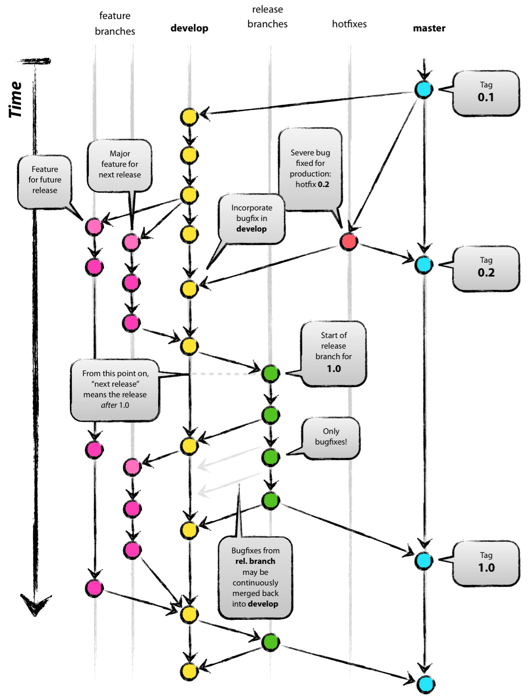
GitFlow, created by Vincent Driessen, is a robust branching model perfect for projects with clearly defined release cycles. It provides a highly organized structure for managing features, releases, and hotfixes.


Key Features:

  • Branches:
    • main: Holds production-ready code.
    • develop: Tracks stable development progress.
    • Supporting branches: Feature, release, and hotfix branches for specific tasks.
  • Workflow:
    1. Developers create feature branches from develop for new features.
    2. Completed features are merged back into develop.
    3. Release branches are created for finalizing and testing releases before merging into both main and develop.
    4. Hotfix branches are used to address urgent issues in main and are merged back into both main and develop.

Pros and Cons:

  • Pros:
    • Provides clear separation of development stages.
    • Ideal for projects with predictable release schedules.
  • Cons:
    • High complexity can slow down teams.
    • Less suitable for environments requiring frequent or continuous updates.

GitLab Flow: Simplicity for Continuous Delivery

GitLab Flow is a modern, streamlined approach optimized for continuous integration (CI) and continuous delivery (CD). It emphasizes simplicity and deployment readiness, making it popular for teams adopting DevOps practices.

Key Features:

  • Branches:
    • Minimal branching, with most work happening on main or short-lived feature branches.
    • Optional environment-specific branches (e.g., staging, production) for deployment workflows.
  • Workflow:
    1. Developers create feature branches and submit merge requests for peer review and automated testing.
    2. Approved changes are merged directly into main.
    3. CI/CD pipelines automate testing, integration, and deployment.

Pros and Cons:

  • Pros:
    • Simplifies branching and deployment processes.
    • Encourages rapid iteration and frequent updates.
  • Cons:
    • Lacks structure for managing long-term parallel development.
    • Relies heavily on robust CI/CD systems for success.

Quick Comparison: GitFlow vs GitLab Flow

Aspect GitFlow GitLab Flow
Branching Model Multi-branch (develop, feature, release, hotfix) Minimal branching (main, optional environment branches)
Complexity High Low
Focus Release management Continuous delivery
Use Case Scheduled releases, complex projects Frequent updates, DevOps practices

Choosing the Right Workflow

  • Choose GitFlow if your project has clearly defined release cycles, involves long-term maintenance, or requires structured parallel workstreams.
  • Choose GitLab Flow if your team operates in a fast-paced environment with frequent deployments and leverages CI/CD pipelines for efficiency.


Picture of the Day:

[image or embed]

— Dr. Tree (@lannyland.com) January 4, 2025 at 1:08 PM

P.S. Remember, the easiest way to keep up with my journey is by visiting blog.lannyland.com 

Saturday, January 04, 2025

Tech Bits: Gitflow, Git Feature Branch, and Trunk-Based Development

Other Tech Bits Posts


Starting a new blog series (tag) where I'll be sharing bits of tech knowledge from time to time. Through this exercise, I aim to clarify concepts for myself while providing readers with a straightforward way to brush up on their tech knowledge. If you find this series helpful, make sure to click "Tech Bits" in the sidebar to explore more posts.


Git is an industry-standard tool for managing version control, especially in distributed development environments. How you manage branches in Git can have a major impact on your workflow efficiency. Among the most widely adopted Git workflows are Gitflow Workflow, Git Feature Branch Workflow, and Trunk-Based Development. Each offers unique advantages and is suited to different team dynamics and project requirements. In this post, we’ll break down these workflows and highlight their differences to help you decide which one aligns best with your team's needs.

Gitflow Workflow: Structured and Release-Oriented

Gitflow Workflow is a branching model designed for projects that follow a scheduled release process. Its structure makes it well-suited for teams managing multiple versions or releases of a product.

How It Works:

  1. Two primary branches:
    • main (or master): Stores production-ready code.
    • develop: Tracks stable development code.
  2. Supporting branches include:
    • Feature branches: Created off develop for new features.
    • Release branches: For preparing a release from develop.
    • Hotfix branches: For urgent fixes applied to main.
  3. Features are merged into develop. Releases are merged into both main and develop.

Pros:

  • Clear structure with designated branches for different purposes.
  • Easy to maintain multiple production versions.
  • Great for projects with predictable, periodic releases.

Cons:

  • Can become overly complex for small teams or continuous delivery setups.
  • Requires careful coordination to avoid bottlenecks.


Git Feature Branch Workflow: Simplicity and Focus

The Git Feature Branch Workflow emphasizes simplicity. Each feature or bug fix is isolated in its own branch, and changes are merged back into the main branch upon completion.

How It Works:

  1. Developers create feature branches off the main branch.
  2. Once a feature is completed and reviewed, it’s merged back into main.
  3. Continuous Integration (CI) pipelines ensure the quality of each change before merging.

Pros:

  • Simple and easy to understand.
  • Encourages isolated and focused work on specific features or fixes.
  • Works well with CI/CD pipelines for automated testing and deployment.

Cons:

  • No explicit support for managing releases or parallel versions.
  • Larger teams might encounter coordination challenges without additional structure.


Trunk-Based Development: Fast and Continuous

Trunk-Based Development (TBD) is all about speed and frequent integration. Developers work on a single main branch, often referred to as the “trunk.” Any branches created are short-lived, existing only for the time it takes to complete a task.

How It Works:

  1. Developers make small, incremental changes and merge them into the main branch quickly.
  2. Feature toggles (flags) manage unfinished or experimental code in production.
  3. CI/CD pipelines handle testing and deployment to ensure every change is production-ready.

Pros:

  • Ideal for fast-paced development and continuous delivery.
  • Reduces merge conflicts by encouraging frequent integration.
  • Simplifies branch management with minimal branching.

Cons:

  • Requires robust automated testing and CI/CD pipelines.
  • Feature toggles add complexity for managing incomplete work in production.


Comparing the Workflows

Here’s a quick side-by-side comparison of these workflows:

Aspect Gitflow Workflow Git Feature Branch Workflow Trunk-Based Development
Complexity High Moderate Low
Use Case Scheduled releases Flexible projects Continuous delivery
Branching Strategy Multi-branch Feature isolation Single branch (trunk)
Release Management Explicit release branches None Directly from main
Integration Frequency Less frequent Moderate Frequent
Tools Needed Minimal Minimal Robust CI/CD, toggles


Which Workflow Should You Choose?

The right workflow depends on your team’s needs:

  • Gitflow Workflow is ideal for projects with scheduled releases or multiple production versions. It’s popular in enterprise environments where structure is critical.
  • Git Feature Branch Workflow suits smaller teams or projects without rigid release schedules. It’s straightforward and integrates well with CI/CD pipelines.
  • Trunk-Based Development works best for fast-moving teams focused on continuous delivery. It’s common in modern DevOps practices.

By understanding these workflows, you can better align your version control strategy with your project goals and team dynamics. Choose the one that empowers your team to deliver high-quality software efficiently. 

You might also find this post interesting:

Tech Bits: GitFlow vs GitLab Flow


Other Tech Bits Posts


Picture of the Day:


[image or embed]

— Dr. Tree (@lannyland.com) December 31, 2024 at 12:44 PM

P.S. Remember, the easiest way to keep up with my journey is by visiting blog.lannyland.com